Your ecommerce platform, ERP, CRM, warehouse system, and other business applications each manage different parts of your operation. The challenge is keeping data moving reliably between those systems as integration requirements grow.
You can connect systems directly through APIs, manage integrations through an iPaaS, build custom integration logic, or combine these approaches.
The right choice depends on what you need to connect, how complex the workflows are, how much control is required, and who will maintain the integrations over time.
API vs iPaaS vs Custom Integration: Quick Answer
API integration connects applications directly through their APIs. iPaaS provides a platform for managing integrations across multiple applications, while custom integration uses purpose-built logic for requirements that standard connections cannot handle. These approaches can also work together in a hybrid architecture.
What Is API Integration?
API integration connects two applications through an application programming interface (API), allowing them to exchange data through defined endpoints, requests, and responses.
How it works: One system sends a request to an endpoint exposed by another system, receives a structured response, and processes the result.
For example, Shopify → API → ERP can send order data from Shopify to the ERP when a customer completes a purchase.
Where it fits: API integration works well for focused connections between a small number of systems with relatively straightforward data flows.
- Advantages: Direct control over the connection and how data is exchanged.
- Limitations: The implementation team handles error handling, retries, monitoring, authentication, and adapting the integration when APIs change.
Is API integration the same as custom integration?
No. API integration uses an application’s existing API to exchange data, while custom integration can use APIs and add purpose-built logic for data validation, transformation, routing, or processing.
What Is iPaaS?
iPaaS (integration platform as a service) is a cloud-based platform for building, running, and managing integrations between multiple applications.
How it works: An iPaaS uses application APIs through connectors, maps and transforms data between systems, automates workflows, and provides visibility into integration activity. For example:
Shopify → iPaaS → ERP → CRM → Inventory
A single workflow can move an order from Shopify to the ERP, update customer information in the CRM, and synchronize inventory without building separate point-to-point connections for every system.
Celigo’s integrator.io is an example of an iPaaS platform. Celigo provides connectors and Integration Apps for application pairings such as Shopify and NetSuite.
See how an iPaaS approach works in a real ecommerce integration: Shopify–NetSuite Integration With Celigo.
Where it fits: iPaaS is useful when several applications need to exchange data through recurring or multi-step workflows and the integration environment benefits from centralized management.
- Advantages: Prebuilt connectors reduce development effort, and monitoring and data mapping live in one place.
- Trade-offs: Licensing costs, platform dependency, and limits on what a connector can do.
What Is Custom Integration?
Custom integration is purpose-built software that moves and processes data between systems according to specific business or technical requirements. It can use existing APIs, build new APIs, or connect systems that lack suitable standard connectors.
For example:
Shopify → Custom Integration → ERP → Custom Inventory Logic
An e-commerce business may allocate inventory based on warehouse location, customer tier, and contract terms. If a standard connector cannot apply those rules, custom integration can incorporate them into the workflow.
When should you build one?
Custom integration is useful when standard connectors or platform capabilities cannot support the required workflow, or when you need to connect legacy, proprietary, or highly specialized systems.
- Advantages: Greater flexibility and control over how the integration handles business-specific requirements.
- Trade-offs: More development effort and greater responsibility for testing, documentation, monitoring, security, and future changes.
How Do API, iPaaS, and Custom Integration Compare?
The key difference is where the integration logic lives and how much of that logic your team needs to build and maintain.
| Factor | API Integration | iPaaS | Custom Integration |
|---|---|---|---|
| Number of applications | Best for focused connections between a small number of systems | Well suited to environments with multiple applications | Depends on the custom architecture |
| Integration model | Point-to-point | Centralized integration layer | Purpose-built solution |
| Workflow complexity | Simple to moderate workflows | Moderate to complex, multi-step workflows | Complex or highly specific workflows |
| Data transformation | Usually coded | Configuration and platform capabilities | Fully programmable |
| Connector availability | Requires compatible APIs | Prebuilt connectors can reduce development effort | Connector availability is less relevant |
| Development effort | Varies based on the API and workflow | Often lower for supported applications | Generally higher |
| Scalability | Additional connections can increase development effort | Designed to support expanding integration environments | Depends on how the solution is engineered |
| Platform dependency | Lower | Higher | Lower, but dependent on custom code and underlying systems |
| Best fit | Focused system-to-system data exchange | Multiple applications and recurring workflows | Requirements that need specialized logic |
With the core differences in mind, the next step is to see how these approaches apply to common ecommerce integration needs.
Which Integration Approach Is Best for Ecommerce?
Ecommerce integrations connect your storefront with order, customer, inventory, fulfillment, and finance systems. ERP integration services can support these connections. Common needs include:
- Ecommerce → ERP: Orders, products, pricing, and customer data
- Ecommerce → CRM: Customer and order information
- Ecommerce → Inventory: Stock levels and product availability
- Ecommerce → Accounting: Orders, payments, refunds, and financial data
- Ecommerce → Warehouse: Orders, fulfillment, and shipment information
The right approach depends on how these systems need to communicate and becomes easier to evaluate when you look at how data moves through an actual ecommerce workflow.
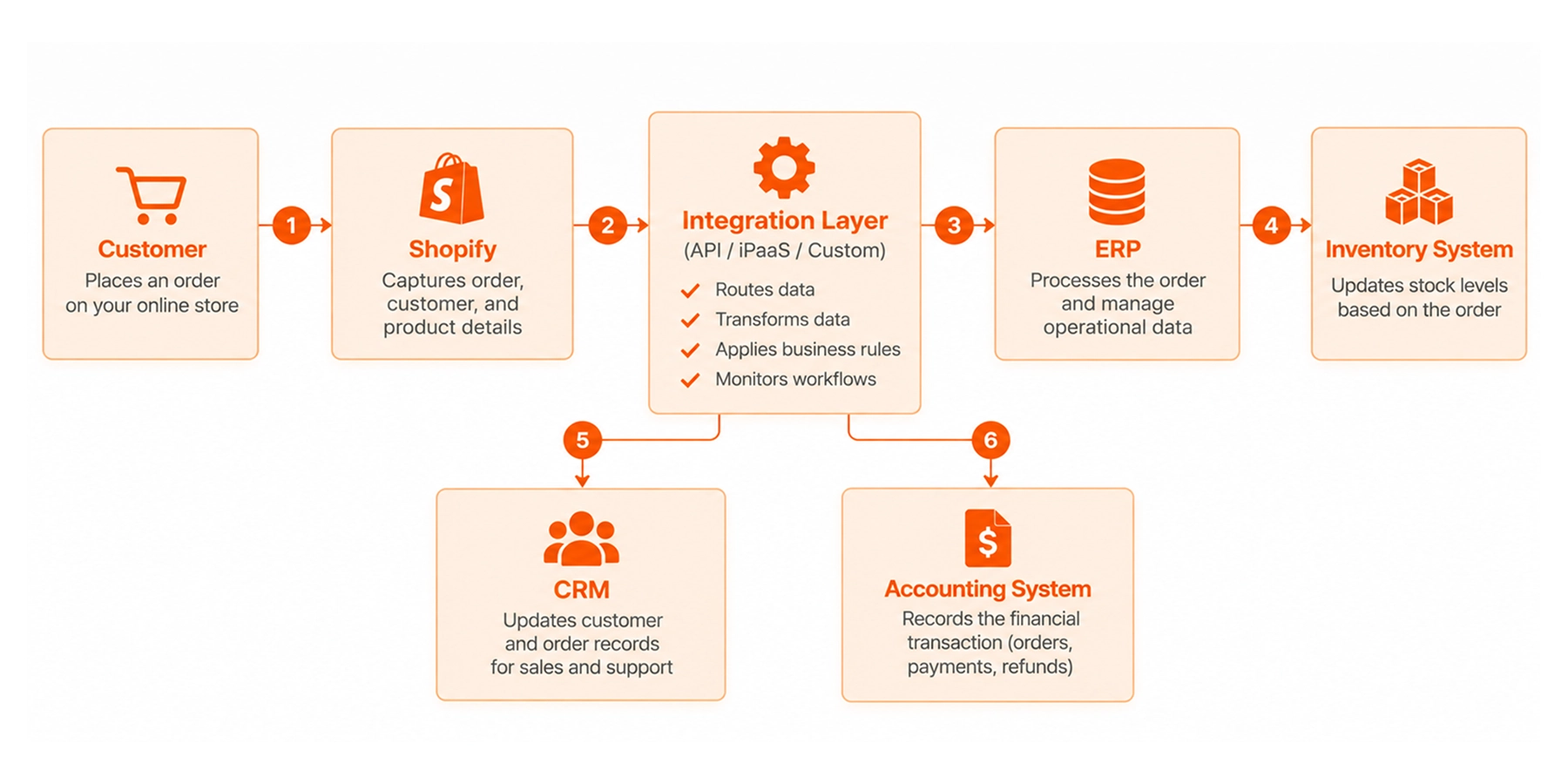
A Typical Ecommerce Integration Workflow
For example, an ecommerce business using Shopify, an ERP, a CRM, inventory, and accounting systems may have a workflow like this:
What Should You Consider Before Choosing an Integration Approach?
Once you understand the available approaches, a few practical considerations can help shape the final architecture:
- Data ownership: Define which system is the source of truth for orders, customers, products, inventory, and other key data.
- Data direction: Determine whether information needs to move one way or whether systems need to exchange updates in both directions.
- Sync requirements: Decide whether data needs to move in real time, on a schedule, or only when a specific event occurs.
- Security and access: Consider authentication, permissions, sensitive data, and any compliance requirements that apply to the systems being connected.
- Failure handling: Plan what should happen when an API is unavailable, a transaction fails, or data cannot be processed correctly.
- Future changes: Consider how easily the architecture can adapt when an application, API, business process, or data requirement changes.
Choosing the Right Integration Approach
At its core, enterprise integration is all about how smoothly your systems share data and power your everyday workflows. Point-to-point APIs work great for quick, direct connections, while an iPaaS can seamlessly link up your ecommerce, ERP, CRM, and accounting platforms. When standard options fall short, custom logic can step in to handle unique business needs.
That is where the right integration partner can make a difference. Digital Radium brings these capabilities together to help businesses:
- A clear view of how data moves: We review the systems, data structures, and dependencies behind each workflow.
- Fewer unnecessary point-to-point connections: We identify where a centralized integration layer can simplify the setup.
- The right mix of standard and custom: iPaaS workflows where they fit, custom APIs or logic where you need more control.
- Integrations that keep up with change: Workflows built to support new systems, data requirements, and business processes.
Not sure which approach fits your stack? Talk to our integration team about your systems and workflows.
FAQ
I have Shopify, an ERP, and a CRM. What's the best way to connect them?
An iPaaS can be a good fit when Shopify, an ERP, and a CRM need to work together across several processes. It provides a central place to manage connections and data flows, while APIs or custom development can handle requirements that need more control.
Should I use an iPaaS or build a custom integration?
Use an iPaaS when your systems are supported, and your requirements fit its connectors and capabilities. Custom development is better for proprietary systems, complex rules, or functionality that standard integration tools can’t support. Both can be used within the same architecture.
What's the difference between using an iPaaS and building an API integration?
An API is a communication method between applications, while an iPaaS is a platform for managing integrations. An iPaaS can use APIs behind the scenes while also providing connectors, data transformation, monitoring, and tools for managing integration processes.
How can I automate data between several business systems?
Start by identifying the information that needs to move between each system and the events that trigger those transfers. From there, an integration platform, APIs, or custom development can automate the required processes and reduce repetitive manual data entry.
How can I send ecommerce orders to my ERP automatically?
Connect your ecommerce platform to the ERP so order details are transferred when a purchase is placed. The setup can also include customer, product, payment, and fulfillment information, depending on what the ERP needs to process each order.
We have multiple systems that don't share data. How should we connect them?
First, identify which systems need to communicate and what information they need to share. Then choose the best connection for each relationship. This may involve direct APIs, an integration platform, custom development, or a combination of these approaches.
When should a company use an integration platform instead of custom development?
An integration platform is useful when you need to connect several supported applications and manage recurring data flows without developing every connection from scratch. Custom development becomes more relevant when the requirements involve unsupported systems, proprietary processes, or specialized functionality.
Can I use APIs through an iPaaS platform?
Yes. iPaaS platforms commonly use APIs to communicate with connected applications. The platform adds a layer for configuring connections, transforming information, monitoring activity, and managing the processes built around those API calls.
Do I need custom integration if an iPaaS already has connectors?
Not necessarily. A connector may cover the standard requirements between two applications. Custom development is needed only when the available connector or platform cannot support a specific business rule, data requirement, or system behavior.
Need technical assistance?
Schedule a 30-minute discovery session with our Magento architects.
FREE CONSULTATION