Artificial intelligence and automation are transforming the way eCommerce organizations operate, make decisions, and grow. Yet many teams still encounter the same roadblocks: data scattered across storefronts and back-office systems, manual workflows that fail to scale, and governance gaps that create operational risk. The result? Slower fulfillment, higher overhead, and missed market opportunities.
That is why BigCommerce–NetSuite integration is more than a technical connection; it is a strategic commitment to deliver intelligence where it creates the most value: directly inside the business processes your teams use every day, leveraging your trusted data.
In this playbook, we explain how a BigCommerce NetSuite integration works, what should be synced, and how to choose the right approach for your operations.
What Does BigCommerce–NetSuite Integration Actually Do?
A BigCommerce–NetSuite integration is a connected solution that consolidates your business-critical data, reinforces data governance, and delivers automation directly within your most essential workflows.
By connecting your digital storefront with your core ERP, you move beyond static snapshots and enable intelligent, real-time decision-making.
What Data Should Be Synced Between BigCommerce and NetSuite?
The goal is not to sync everything; it is to ensure high-quality data moves in the right direction at the right time. When integrating BigCommerce with NetSuite, enterprise teams focus on four core data pillars to ground their operations in reality:
- Orders → BigCommerce to NetSuite: Every transaction is captured with line-item precision, ensuring financial processing happens within your trusted ERP environment.
- Inventory → NetSuite to BigCommerce: Stock levels originate from your single source of truth—NetSuite—to prevent overselling and maintain customer confidence.
- Customers → Bidirectional Sync: Unify customer records across both systems to provide a 360-degree view of the buyer journey without duplication.
- Fulfillment → NetSuite to BigCommerce: Shipping status and tracking data flow back to the storefront, allowing customers to act on trustworthy insights in real-time.
Additional Data (As You Expand)
Once the core flows are stable, you can extend your integration to include:
- Products & Pricing → Sync product catalog, SKUs, and pricing rules
- Payments & Refunds → Ensure accurate financial reconciliation
- Returns & Credits → Align inventory adjustments and credit handling
- Tax Data → Maintain consistency for reporting and compliance
How Does BigCommerce–NetSuite Integration Work?
A BigCommerce NetSuite integration works by automatically moving data between your storefront and ERP based on defined triggers, mappings, and workflows.
For instance, when a customer places an order, that data is captured and processed in NetSuite, and then synced back to BigCommerce with updated information.
This creates a continuous loop where orders and updates stay aligned across both your systems without manual intervention.
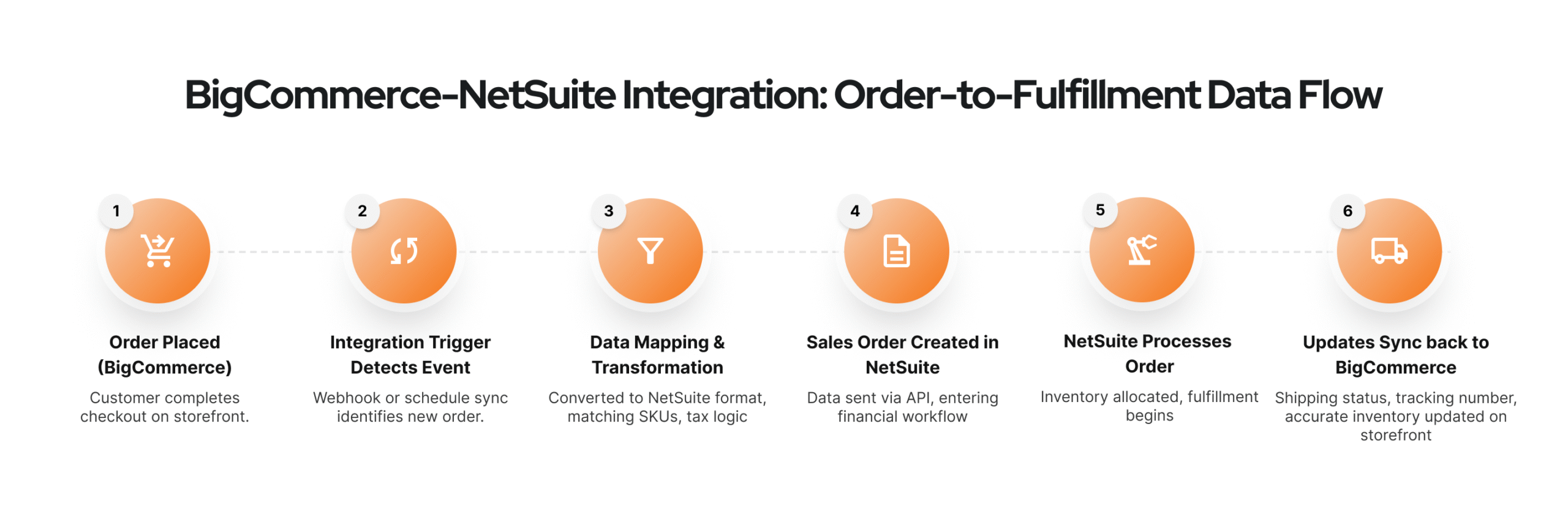
Step-by-Step Integration Flow
- Order is placed in BigCommerce
A customer completes checkout, and BigCommerce creates an order with complete details, which becomes the starting point of the integration.
- Integration trigger detects the event
A webhook or scheduled sync identifies the new order and triggers the integration to begin processing the data.
- Data is mapped and transformed
The integration layer converts BigCommerce data into NetSuite’s format, matching SKUs, aligning pricing and tax logic, and handling any custom fields or rules.
- The order is created in NetSuite
The mapped data is sent via API, creating a sales order in NetSuite where it enters fulfillment and financial workflows.
- NetSuite processes the order
Inventory is allocated, fulfillment begins (warehouse or 3PL), and financial records are generated within NetSuite.
- Updates sync back to BigCommerce
Shipping status, tracking numbers, and updated inventory levels are sent back to BigCommerce, ensuring the storefront reflects accurate information.
What Are the Different Ways to Integrate?
Choosing Your Architecture: The Path to Extensibility
Organizations must choose an architecture that balances speed with long-term extensibility.
- Purpose-Built Connectors: Celigo – a leading iPaaS platform offers pre-packaged “Integration Apps" designed to handle complex eCommerce logic, such as automated refunds and partial shipments, out of the box.
Best For You If: You are a fast-growing brand that requires a reliable, highly scalable foundation without the long lead times of custom development.
- General Middleware (iPaaS): Platforms like Boomi or Workato allow you to build custom, cross-functional workflows across your entire enterprise stack, extending far beyond the storefront.
Best For You If: You lead a mature enterprise managing dozens of fragmented applications and require a “single pane of glass" for global data orchestration.
- Custom API Integration: A direct, code-heavy link engineered by developers to provide total control over every data packet.
Best For You If: Your organization operates a highly unique or proprietary business model that traditional “off-the-shelf" logic simply cannot support.
Still updating NetSuite every time an order comes in?
Let’s connect the two so the data moves on its own — no more missed orders.
Critical Configuration: What to Check Before Going Live
Working on an unconfigured integration is the fastest way to break your accounting. Prioritize these Business-Critical Checkpoints, to ensure your automated data flows remain configured:
- Provision API Credentials: Securely authorize your integration layer using Token-Based Authentication (TBA) in NetSuite.
- Map Payment & Shipping Methods: Ensure every gateway and carrier is mapped to its corresponding GL account or “Ship Via" list in NetSuite.
- Assign Location Logic: Configure “Location Mapping" so the integration pulls inventory from the correct NetSuite warehouse.
Strategic Risks: Avoiding Common Integration Failures
Even the best tools fail if your data is messy. Most integration headaches stem from these Governance Gaps:
- SKU Mismatches: If a product is added to BigCommerce but not activated in NetSuite, the order sync will fail.
- Tax Nexus Errors: Orders will be rejected if BigCommerce collects tax for a state that isn’t configured as a “Nexus" in NetSuite.
- Incomplete Testing Scenarios: Don’t just test perfect orders; you must test partial refunds and international duties to ensure your logic holds under pressure.
Understanding the ROI of Integration
The Financial Reality: Your Strategic Investment vs. Value
The BigCommerce–NetSuite integration cost is an investment in agility. Modern enterprise leaders view integration as a high-yield asset, not an expense.
According to IDC benchmarks, organizations that unify their eCommerce and ERP environments achieve an average 391% three-year ROI, often reaching break-even in just seven months.
- Eliminating the “Manual Tax": According to research from Resolve Pay, manual order processing in 2026 costs an average of $15–$18 per transaction. Automation via platforms like Celigo brings that figure down to approximately $3 per transaction, an 80% reduction in overall overhead costs.
- Accelerated Revenue Recognition: As noted in studies by Anchor Group, organizations leveraging deep integration typically experience a 40–60% reduction in month-end close time, reclaiming 30% of finance team capacity for strategic forecasting.
- Partner-Led Governance: Working with a Certified Celigo Partner reduces the risk of overspending on self-deployments by ensuring the integration logic is scalable, and all field mapping is audit-ready from day one.
Your Path Forward: Building a Unified Commerce Enterprise
The goal of your BigCommerce–NetSuite integration is to move your organization from reactive data entry to proactive, strategic business management. By aligning your storefront and ERP, you gain the operational clarity needed to make faster decisions and the infrastructure without manual data overhead.
However, a successful integration is only as strong as the storefront it supports. At Digital Radium, our BigCommerce development services go beyond simple aesthetic design.
We specialize in building high-performance, enterprise-grade commerce environments that are architected from day one to sync seamlessly with your back-office logic.
Whether you are seeking to optimize your current checkout flow or re-platform to a more scalable architecture, our team ensures your digital storefront is not a silo, but a fully integrated engine for your business.
Ready to activate the full potential of your data? Discover how our partner-led approach to BigCommerce and NetSuite integration can transform your operations from a source of overhead into your greatest competitive advantage.
FAQ
Do I need middleware for my BigCommerce–NetSuite integration?
If your business involves multi-warehouse fulfillment or complex tax rules, middleware is essential. It acts as your governed orchestration layer, preventing data silos and ensuring BigCommerce and NetSuite best practices are maintained during high-velocity periods like Black Friday.
How complex is the integration for my growing brand?
The complexity depends on your data integrity. While the technical BigCommerce and NetSuite connector setup is standard, the strategic challenge is aligning back-office financial rules with your storefront UX to ensure enterprise scalability.
Can I sync B2B-specific data like corporate accounts and price lists?
Yes. By leveraging BigCommerce B2B Edition, you can architect the sync to include your company accounts and negotiated price lists. This functionality is why enterprise leaders choose this ecosystem for integrating BigCommerce with NetSuite to drive B2B growth.
How long will my implementation take?
A fully governed, enterprise-grade deployment typically requires 4 to 12 weeks. This timeline allows for how to integrate BigCommerce with NetSuite step by step, including data auditing, field mapping, and rigorous sandbox testing to ensure flawless reporting.
Can the integration manage my complex product bundles or kits?
Yes, provided you have precise architectural alignment. We ensure your storefront “Product Bundles" map directly to “Assembly" or “Kit Items" in NetSuite, allowing your inventory to decrement accurately at the component level across all global nodes.
Can my current storefront architecture support high-volume sync speeds?
We optimize your store for ERP compatibility by ensuring your BigCommerce NetSuite integration uses lean data models and API structures that handle massive transaction spikes without compromising performance.
How do I handle international expansion and multi-currency tax?
A BigCommerce–NetSuite integration maps your international tax nexuses (VAT/GST) directly to NetSuite tax items. The system manages your real-time currency conversion and local duties, ensuring your global revenue recognition remains accurate and audit-ready.
Who is accountable for my data integrity if a sync fails?
Accountability is managed through your Data Governance rules. We architect “self-healing" logic to avoid BigCommerce–NetSuite integration mistakes, ensuring that if an API timeout occurs, your records remain uncorrupted and your team is immediately alerted.