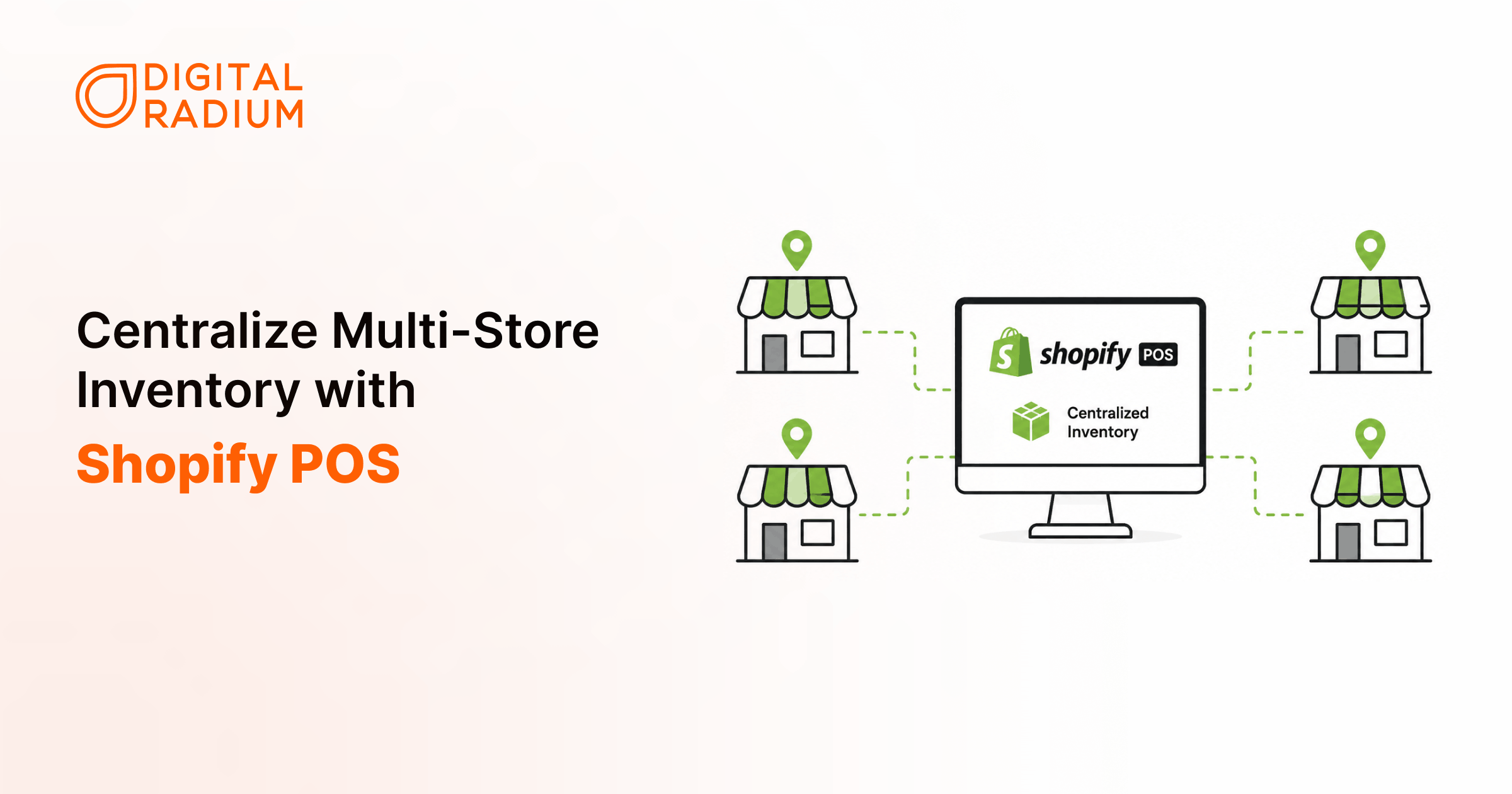
To centralize inventory across multiple store locations with Shopify POS, set up each of your stores, warehouses, and fulfillment centers as a location in Shopify admin, then let every channel, read from and write to the same shared inventory record.
For example, your in-store sales, returns, and transfers update that record immediately, and e-commerce availability recalculates automatically.
The result: one source of truth instead of separate spreadsheets and disconnected POS systems.
In this article we’ll cover,
1. What Centralized Inventory Means
2. Why Multi-Location Inventory Breaks
3. How Shopify Pos Locations Work
4. How Sync Prevents Overselling
5. How Order Routing And The Transfer Works
6. Why Inventory Still Breaks After Shopify Pos
7. Where Shopify Pos Reaches Its Limits
8. Key Takeaways
9. FAQ
The Monday-morning problem
You run three retail stores and an ecommerce site. Every Monday morning, your team spends the first hour reconciling inventory, comparing what the system shows against what’s actually on shelves.
One store sold out over the weekend. Another still shows that product as available. Your e-commerce channel oversold an item that physically went out of stock on Friday. Now staff are manually checking transfers, refunding orders, and updating spreadsheets before the week has even started.
The problem is not that you have multiple locations; it’s that your inventory no longer behaves like a single system.
Multi-location inventory issues happen when your stores and other platforms stop sharing the same inventory logic. Once that happens, reconciliation stops being an exception and becomes part of daily operations. Centralizing inventory in Shopify POS is what pulls those moving parts back into one system.
What is centralized inventory management?
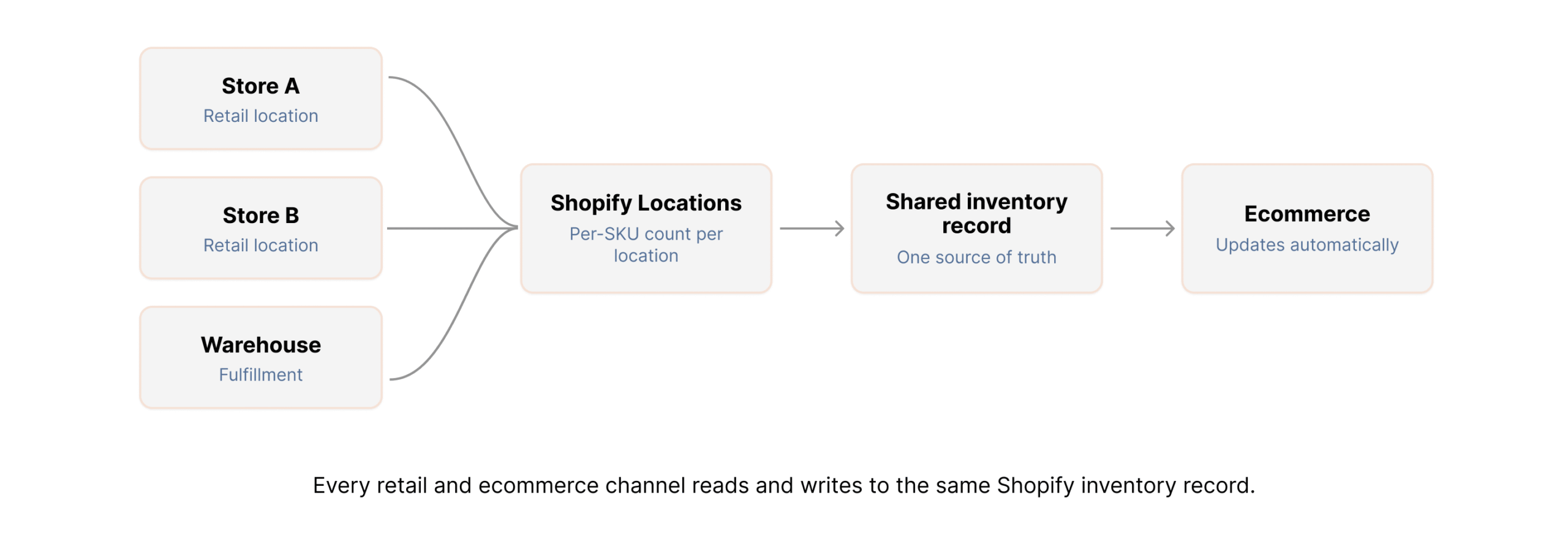
Centralized inventory management on Shopify means every store, warehouse, and ecommerce channel works from the same inventory record. Instead of separate spreadsheets, disconnected POS systems, or delayed batch updates, every inventory change flows through one shared system, the same logic behind every well-run centralized retail inventory system.
- In practice, centralized inventory means:
- Transfers between locations are tracked centrally
- Purchasing teams see real stock movement, not stale counts
- Staff stop relying on manual reconciliation
Without centralized visibility, every location starts behaving independently. As accuracy drops, teams invent workaround, spreadsheet tracking, text confirmations, store-level stock holds, offline adjustments. Eventually nobody fully trusts the numbers, and the workarounds become the system.
Why does inventory break across multiple store locations?
Every new location creates another inventory data point that has to stay synchronized. Without a centralized retail inventory system, those points drift apart fast.
A common pattern: Store A and Store B track inventory separately, ecommerce reads from a third source, warehouse transfers get logged hours after the stock physically moves, and staff manually adjust counts after closing. By Monday, the numbers are already stale.
The operational damage compounds quickly:
- Products oversell online
- Stores issue refunds and absorb the customer-experience hit
- Purchasing decisions are made on inaccurate counts
- Replenishment becomes reactive instead of planned
- Teams spend their time fixing inventory instead of selling
Once purchasing and replenishment rely on bad counts, stockouts and overbuying start compounding across every location at once.
How does Shopify POS manage multi-location inventory?
Shopify POS manages multi-location inventory through a system called Locations. Each store, warehouse, pop-up, or fulfillment center becomes a Location inside your Shopify admin.
Every Location keeps its own inventory count per SKU while still feeding one centralized inventory system, that’s the mechanism behind Shopify inventory across multiple locations behaving like one shared record.
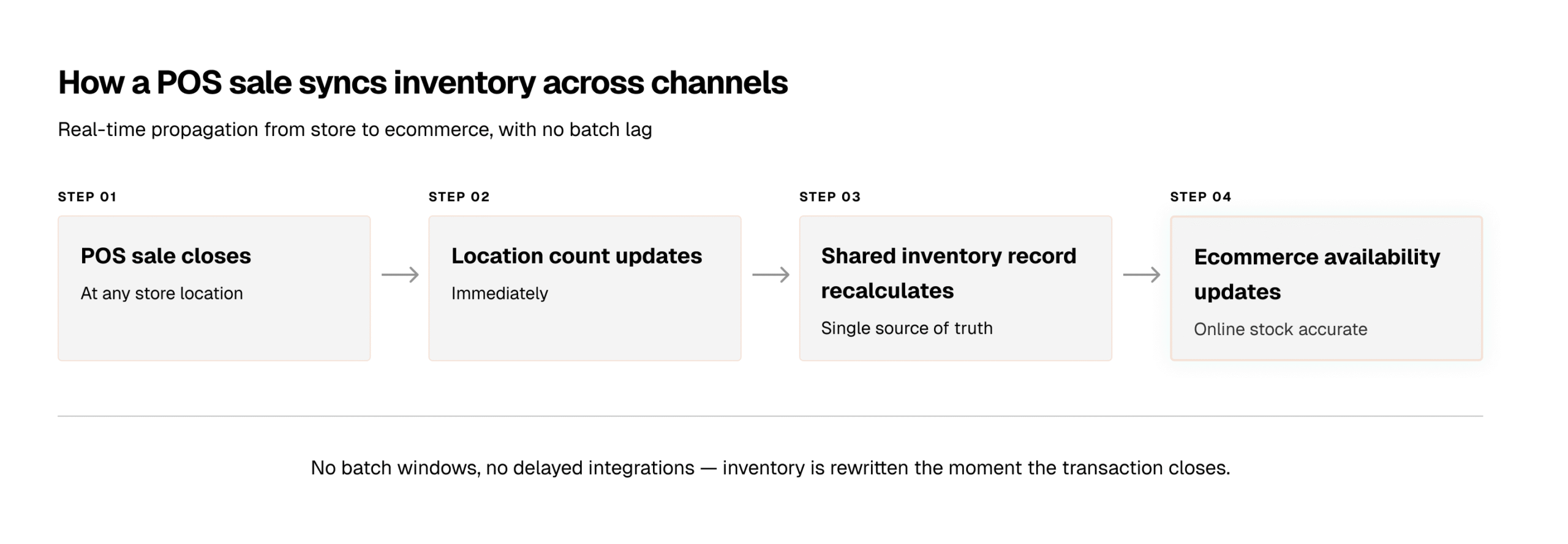
When a POS sale happens at Store B:
- Store B’s inventory count decreases immediately
- Shopify recalculates total available inventory
- Ecommerce stock updates automatically
- Other Locations keep their own independent counts
Operationally, this changes how decisions get made.
-Store managers stop working from isolated counts.
-Purchasing teams can see where inventory is moving fastest, which Locations are overstocked, where replenishment is needed, and which stores should fulfill incoming orders.
How does Shopify POS inventory sync prevent overselling?
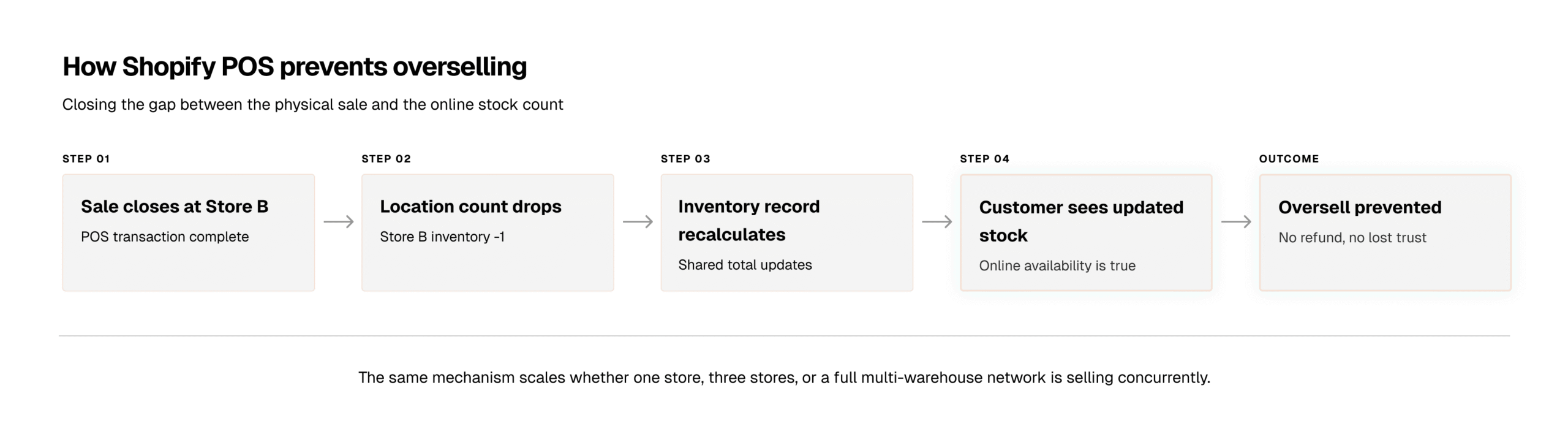
Shopify POS inventory sync prevents overselling by updating the shared inventory record the moment a transaction closes, rather than in delayed batches.
- In disconnected systems, inventory updates run in batches or through lagging integrations.
- That creates a gap between what physically sold and what other channels still believe is available, and that gap is where overselling happens.
- Shopify POS closes the gap by writing to the inventory record at the point of sale.
If a store is marked as retail-only, its inventory can stay available for walk-in customers without contributing to online availability. That distinction matters for retailers managing limited inventory, local exclusives, seasonal stock, or high-demand products.
Order Routing and Transfer Workflow Summary
- Order Routing: The system uses the shared inventory record to automate fulfillment decisions. It can prioritize locations based on proximity to the customer, current inventory depth, or shipping speed. This ensures that ecommerce orders are fulfilled from the most logical location without manual intervention, while simultaneously reserving stock for local pickups to prevent walk-in stockouts.
- Transfer Workflow: Centralization replaces disconnected spreadsheets with a real-time tracking system. When stock moves between locations, the system tracks the items from the initial request through “in transit" status to final destination confirmation. This visibility prevents stock from “disappearing" during moves and keeps the total available inventory count accurate across the entire network.
While these automated workflows create a strong foundation, true inventory accuracy still depends on operational discipline.
Why does inventory still break after implementing Shopify POS?
Many retailers assume inventory problems disappear the moment Shopify POS is live. Operationally, that’s rarely true. Shopify POS gives you the infrastructure for accuracy, but inventory still fails when teams bypass the workflow itself. There are four recurring failure modes:
- Inventory ownership becomes unclear. Warehouse teams, ecommerce teams, and retail stores all adjust inventory independently. Without a clearly defined inventory authority, multiple groups overwrite each other’s counts. At that point the problem is no longer sync speed – it’s competing inventory authority.
- Teams bypass the transfer workflow. Staff move stock physically before logging the transfer. The product arrives at another location before the system reflects it, creating temporary – but real – inaccuracies.
- Multiple apps write inventory simultaneously. ERP systems, marketplaces, warehouse tools, and inventory apps each update stock on their own. Without one authoritative source, sync conflicts become unavoidable.
- Manual adjustments slowly corrupt accuracy. After-hours fixes, emergency edits, and untracked adjustments erode reliability over time. Once teams stop trusting the system, the manual workarounds come back – and you’re back where you started.
Where does Shopify POS reach its limits?
Shopify POS handles centralized inventory well for most retail operations. But as complexity increases, additional infrastructure can become necessary. The honest dividing line:
| Shopify POS handles this natively | This typically needs ERP or middleware |
|---|---|
| Per-location inventory counts across stores, warehouses, and pop-ups | Bundle/kit tracking — Shopify does not natively deduct component-level inventory when a bundle sells |
| Immediate sync between POS sales and ecommerce availability | High SKU complexity with advanced replenishment logic and demand planning |
| Order routing and fulfillment prioritization | Franchise inventory ownership models |
| Tracked transfer workflows with audit trails | Combined wholesale + retail fulfillment |
| Centralized visibility for purchasing teams | Multi-warehouse operations and marketplace synchronization |
When operations cross that line, Shopify POS doesn’t get replaced—it stays the retail execution layer while inventory authority moves upstream to an ERP or middleware system.
Conclusion
Getting Shopify POS inventory management right across multiple locations isn’t about adding more apps. It’s operational consistency, how your inventory moves, updates, and gets fulfilled.
Shopify gives you the infrastructure: locations, synchronized updates, order routing, transfer workflows, and centralized visibility. But long-term accuracy depends on discipline. Scaling inventory across your stores isn’t about running more software; it’s about building rules that keep your stores, warehouses, e-commerce, and fulfillment all working from the same logic.
That last layer is usually where things start to break, and it’s the work we focus on at Digital Radium, a Shopify development agency specializing in Shopify POS integrations, inventory workflows, and scalable ecommerce operations. We help businesses implement Shopify POS, streamline inventory management, and integrate ERP or middleware systems as operations grow.
Key takeaways
- Centralized inventory management on Shopify = one shared record. Every store, warehouse, and channel reads and writes to the same Shopify inventory record across multiple locations.
- Locations are the mechanism. Each store/warehouse is a Shopify location with its own per-SKU count that still feeds one system.
- Sync prevents overselling by removing the lag. Inventory updates at the moment of sale, not in delayed batches.
- Routing rules decide fulfillment automatically—by proximity, depth, speed, or warehouse priority.
- Tracked transfers replace spreadsheets and eliminate phantom inventory.
- The software is not the whole solution. Inventory still breaks when ownership is unclear, workflows are bypassed, multiple apps write stock, or manual edits go untracked.
- Know the limits. Bundles, high SKU complexity, franchises, wholesale+retail, and multi-warehouse operations usually need ERP or middleware on top.
FAQ
Does Shopify POS support bundle inventory tracking?
No, you cannot natively track bundles with Shopify POS. The system does not automatically deduct component-level stock when you sell a bundled product. You should use a bundle app, an ERP, or middleware to break bundles into individual SKUs during checkout and inventory sync.
Can Shopify POS manage wholesale and retail inventory together?
It can, but complexity grows quickly. Once you introduce wholesale pricing, payment terms, separate fulfillment rules, or shared warehouse inventory, most businesses add an ERP or integration layer to keep inventory accurate across both channels.
When do retailers move from Shopify POS to an ERP?
Usually when inventory operations become too complex for native Shopify workflows. Common triggers include bundle tracking, multi-warehouse fulfillment, wholesale + retail operations, marketplace sync, franchise inventory ownership, and advanced demand planning.
Does Shopify POS replace an ERP?
No. Shopify POS is a retail execution system, not a full operational backbone. As businesses scale, the ERP typically becomes the inventory source of truth while Shopify POS continues handling in-store sales and ecommerce transactions.
Can I receive transfers in the Shopify POS app?
Yes. Store teams can receive, count, and reconcile incoming inventory transfers directly inside the Shopify POS app, no desktop admin required. This reduces the delay between inventory arriving at the store and becoming available for sale, while keeping stock records accurate across locations in real time.
How do I prevent inventory drift in Shopify POS?
To prevent inventory drift in Shopify POS, limit inventory adjustments to store managers, require reason codes for manual overrides, and encourage your team to use barcode scanning instead of typing SKUs manually.
These simple operational rules help you keep inventory accurate across multiple store locations and reduce stock mismatches over time.
Need technical assistance?
Schedule a 30-minute discovery session with our Magento architects.
FREE CONSULTATION