Growth has always had a way of exposing problems that were easy to work around when your business was smaller.
Back then, a spreadsheet was enough to keep your inventory roughly aligned. Someone in operations typed orders into the ERP by hand, and the finance team sat down at month-end and reconciled your ecommerce sales manually.
None of that was easy to do, but it worked well enough. Once your business gets bigger, though, that approach starts to break down.
You add a warehouse, a sales channel, a few hundred more orders a month, and suddenly the gaps become harder to ignore. Your Shopify or BigCommerce storefront says one inventory number and NetSuite or SAP says another, leaving the finance team spending a week trying to figure out why the two reports don’t agree.
But why is it so? The reason is the systems themselves usually aren’t broken; the information carrying through them isn’t moving the way it needs to.
When you’re trying to identify ecommerce integration problems, the first place to look is what happens between your systems.
Follow One Order Through Your Business
Pick a typical order and watch where it goes after the customer hits “buy":
Commerce platform → ERP → Inventory → Fulfillment → Shipping → Finance
Along the way, that order may also carry customer-specific pricing, account terms, tax details, shipping rules, or a purchase order number. At each handoff, ask:
- Does the next system receive this information automatically?
- Or does someone have to export a file, reformat it, and enter it by hand?
- If something changes later, does that update reach every system that depends on it?
If a person regularly has to manually pass information between two systems, that’s a sign of a data integration problem.
It also gives you a practical way to see if your ecommerce systems are integrated properly: follow the information, not just the order.
Signs Your Business Has a Data Integration Problem
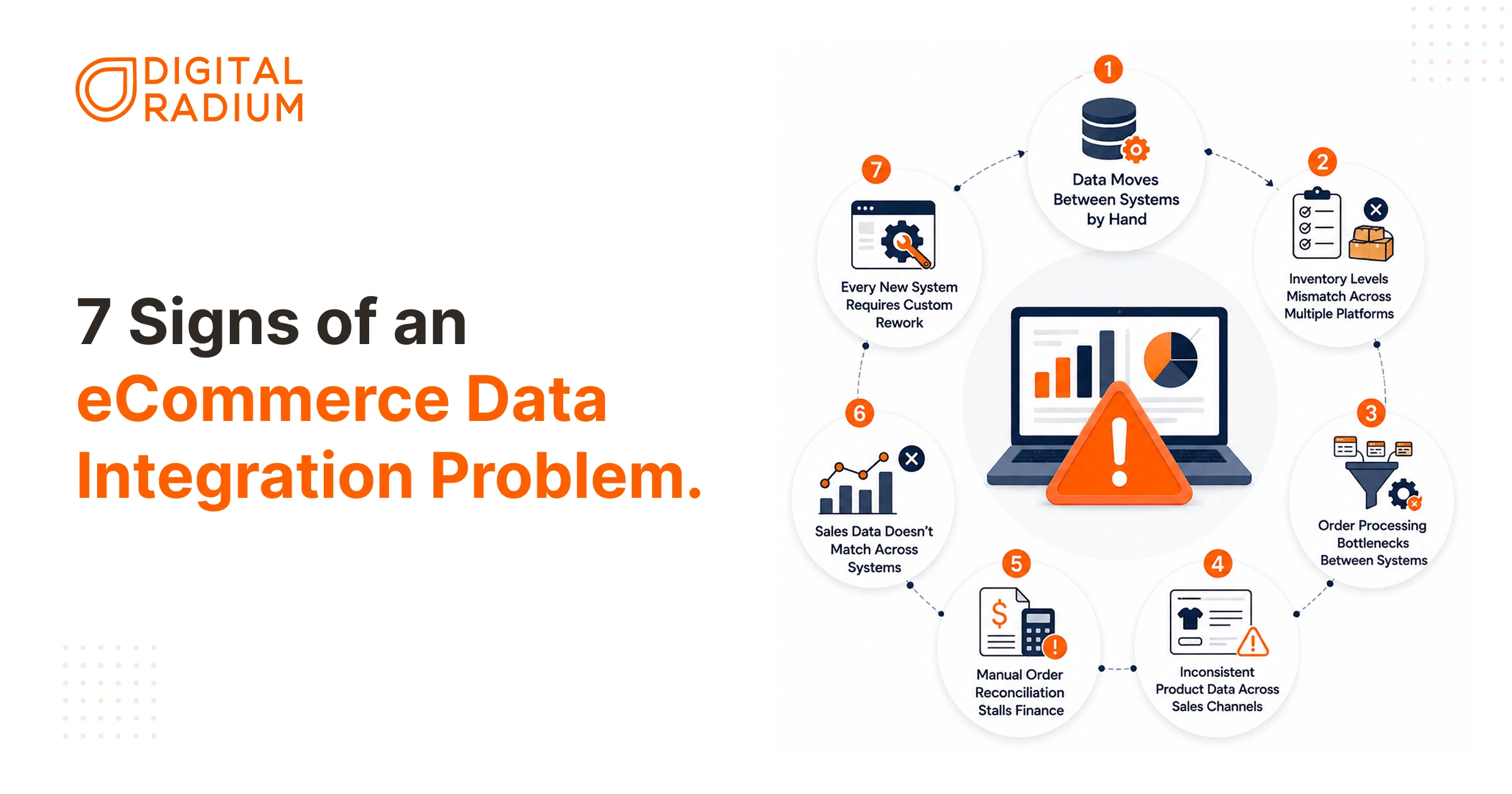
1. Data Moves Between Systems by Hand
Your team is downloading order exports and re-typing customer details into another system, because the systems can’t talk to each other, and nobody’s ever connected them. A few ways this shows up:
- A wholesale order placed on your storefront gets manually re-entered into NetSuite or Dynamics because the case-pack quantity or unit of measure doesn’t translate between the two.
- A purchase order from a distributor arrives by email and sits in someone’s inbox for review before it ever reaches the ERP.
- A sales rep re-keys the same order into two systems because neither one talks to the other.
If you are a manufacturer or a wholesale B2B seller who takes orders through more than one channel, this can happen constantly. You should start asking, Why is my ecommerce data not syncing? That makes this one of the clearest places to look for an integration problem.
2. Inventory Levels Mismatch Across Multiple Platforms
Your storefront shows 25 units. Your ERP shows 18. Neither number is necessarily wrong – they’re just out of sync. If you’re a manufacturer or distributor, “available" inventory can mean several different things at once:
- Raw materials versus finished goods.
- Units in transit between your warehouses.
- Quantity already committed to another order.
- Quantity allocated to a standing distributor agreement.
- What’s sitting at a 3PL that hasn’t reported back yet.
This is where ecommerce data synchronization matters. Inventory information needs to reach your storefront correctly. If even one piece of that information is missing or outdated, you end up selling from incomplete information.
3. Order Processing Bottlenecks Between Systems
Your storefront can accept an order before it’s ready to be fulfilled. It may need something from another system first:
- An account on net-30 terms needs a credit check before the order can proceed.
- A distributor with negotiated rates needs that pricing verified against the account.
- A shipment crossing state lines requires tax to be calculated by an external system.
When that information lives somewhere else with no automatic path to the order, it sits in an email thread or an approval queue while your warehouse waits for someone to clear it.
If you identify these signs in your own operations, a B2B eCommerce development partner can help you resolve these bottlenecks and align your systems effectively.
4. Inconsistent Product Data Across Sales Channels
A single SKU can live in four places at once, each one supposedly showing the same thing:
- Your ERP holds the base pricing and unit of measure.
- A PIM holds the product content and specs.
- Your storefront holds what buyers actually see.
- A distributor portal or marketplace maintains its own copy, often with different pricing tiers based on volume or account type.
When a price or spec changes, it has to reach all four. In practice, it often reaches two. That is one of the most common ecommerce data integration problems as the number of systems and sales channels grows.
5. Manual Order Reconciliation Stalls Finance
A single B2B order rarely moves in one clean step. It might:
- Ship in multiple partial shipments.
- Be invoiced in stages as inventory becomes available.
- Be billed against a purchase order with its own terms.
If fulfillment and shipping data doesn’t flow cleanly into your financial system, your accounting team has to reconstruct that history by hand: comparing what was ordered against what actually shipped, checking invoice quantities, and chasing down discrepancies between your storefront and your ERP.
6. Sales Data Doesn’t Match Across Systems
Ask sales, finance, and operations how much you sold last month, and you may get three different answers:
- A CRM tracking pipeline activity.
- A storefront that only counts orders placed.
- An ERP that only counts invoiced revenue.
These numbers measure different parts of the same sale, so they won’t always match. The problem comes when your teams have to manually compare them to understand what happened to an order after it was placed.
For example, the storefront records the order when the customer buys, while the ERP may only reflect it after it’s processed and invoiced. If that information doesn’t carry through properly, finance has to work backward through the records to explain the difference.
That’s when a reporting mismatch becomes an ecommerce data integration problem.
7. Every New System Requires Custom Rework
There might be a plan to add a new distributor portal, a 3PL, or an EDI trading partner to your network, but that shouldn’t mean rebuilding your integration from scratch. If your connections were built one at a time, point-to-point, without a shared structure behind them, adding another system can expose those weaknesses.
That’s often exactly what happens:
- A warehouse needs its own custom mapping.
- A marketplace listing needs its own one-off script.
- A new sales channel risks breaking a connection that already worked.
Over time, maintaining those connections becomes part of the cost of adding anything new. Your team has to understand how each connection works, test changes across existing systems, and fix one integration without disrupting another.
Once you’ve identified where the problems are showing up, you can start tracing them back through your systems and data.
How to Approach the Problem
- Map Your Systems: commerce, ERP, WMS, CRM, PIM, accounting, shipping, EDI.
- Map Your Data: orders, pricing, inventory, accounts, payments, invoices — and where each originates.
- Establish Ownership: decide which system is authoritative for each data type (your ERP might own credit terms; your PIM might own product content).
- Map Your Business Rules: what happens when a credit limit is exceeded, a product sells out, or a customer has negotiated pricing.
- Choose the Right Approach: APIs, middleware, or an iPaaS platform like Celigo, depending on the complexity and number of systems you’re running.
- Monitor After Launch: records change shape, APIs go down, rules evolve. Monitoring catches failures before they revert to manual work for your team.
Conclusion
Discovering that your business has a data integration problem is proof that you’ve outgrown the way you used to manage your systems. The spreadsheets, email approvals, and manual exports that kept things moving when you were smaller can become bottlenecks as your business grows.
Fixing it doesn’t mean tearing down your entire tech stack and starting over. It starts with clarity: knowing where data gets stuck, establishing which system owns what information, and connecting them so your team stops acting as human middleware.
The best place to start is simply mapping your order lifecycle on paper. Once you can see every manual handoff between your storefront, ERP, and warehouse, turning that friction into an automated integration roadmap becomes straightforward—whether you build it internally or bring in help.
FAQ
How do I know if my ecommerce systems are integrated properly?
Ecommerce systems are integrated properly when order, inventory, customer, fulfillment, and financial data move between systems without repeated manual entry or reconciliation. Each system receives the information it needs to complete its part of the workflow.
Why does my storefront show different inventory from my ERP?
Inventory can differ when the storefront and ERP use different inventory data or update at different times. For B2B businesses, the integration also needs to account for available, committed, allocated, and in-transit inventory before showing what can be sold.
Where should product data be managed: ERP or ecommerce storefront?
The system that owns a specific type of product data should be the source of truth for that data. For example, the ERP may manage SKUs, pricing, and units of measure, while a PIM manages product content and specifications that the storefront receives.
Why do my sales reports in the CRM, storefront, and ERP never match?
Sales reports can differ because each system records a different stage of the transaction. A CRM may track pipeline activity, the storefront records orders placed, and the ERP records invoiced revenue; the key is being able to reconcile those figures without manually reconstructing the transaction.
How do I automate partial shipments and backorders so my ERP and storefront stay in sync?
Partial shipments and backorders require order, inventory, fulfillment, and invoice updates to move between the ERP and storefront as the order changes. We map those workflows first to determine which updates should happen automatically and where manual intervention is still required.
Why does every new 3PL or marketplace require custom integration work?
New 3PLs and marketplaces often require custom work when existing systems rely on separate point-to-point connections, custom mappings, or one-off scripts. We review the current connections and data flows first so the new system can fit into the existing B2B ecommerce setup rather than creating another isolated connection.
Need technical assistance?
Schedule a 30-minute discovery session with our Magento architects.
FREE CONSULTATION